How to audit a closing binder with AI
An AI-assisted way to reconcile a closing binder against its checklist: one structured record per document, every row carrying the document and the language behind it, then the exceptions opened and the conforming rows sampled by hand.
Post-closing binder cleanup rarely earns what it costs, which is why it gets left.
The deal closed last Tuesday. The checklist is a Word document an associate has been ticking by hand. The documents are sixty files on the network drive, named sixty different ways. Somebody has to confirm that every line on the list has a document behind it, that it is the executed version and not the draft that was circulating, and that whoever signed it could sign it. Depending on the client and the fee arrangement it gets billed at a rate nobody is happy with, written down, or absorbed. Either way it is rarely worth a partner's hour on the day. The expensive part arrives months later, when somebody has to reconstruct what was obtained, which version was operative, and what is still open.
So it gets deferred, and the item nobody can find at month nine turns out to be the one nobody can find in the file either.
The job is to prove a negative: that for every row on the checklist, some document in the folder satisfies it. Everything below is machinery for finding the rows where nothing does. That is what makes it different from ordinary document review, where you read a document and ask what is in it. Here the answer is not in any document. It is in the gap between the pile and the list.
Sixty documents against fifty rows is three thousand pairings, which nobody works that way. You go down the list and hunt for each item. That is faster, and it is where the error lives. A search for something you expect to find stops as soon as it finds something close enough. Two hours later you have ticks against every row and no record of what satisfied any of them.
The method below moves that time. Setup runs twenty minutes or so on a folder that is already one document to a file, and considerably longer on a combined scan you have to split first. Most of it is reusable on the next deal of the same shape. The run itself is unattended. What comes back needs checking against the documents, and the split is what makes that affordable. The exceptions and the judgment calls come to you. An associate or paralegal samples the rest.
Read on if the deal is closed, the documents are in a folder, and the checklist is one you trust. If the deal ran on iManage Closing Folders, Legatics or similar, start with its own reconciliation or export. It has tracked deliverables forward from kickoff and will usually tell you what is outstanding. Come back here if what it reports does not match the folder, which happens when documents were delivered off-platform or uploaded late. This is for the deal that never got one.
The worked example is a mid-market asset purchase with a real-property component. The method is the same for a financing or a pure real-estate closing; the source list and the questions you ask about originals and custody are not, so adapt those.
I use docAnalyzer (docanalyzer.ai). It does not draft, negotiate or advise. It matches a pile against a list, shows you what is not there, and leaves the document and the supporting language behind every row it does answer. What it establishes is narrow: that a document in the folder answers a row, or that none does. Whether that document was delivered, released from escrow, recorded or accepted is a separate question and nothing here touches it.
If you already use docAnalyzer
A map for a reader who knows what a label and a workflow are. It points at the steps rather than replacing them, and what it marks in bold is what decides the result.
| You, about twenty minutes | Steps 1–2. Rewrite each checklist row so a document can be tested against it, and write the one-page facts sheet: who could sign and since when, the parties, the two dates, what is of record. Skip these and the run comes back clean on a binder that is not. |
| You, a few minutes | Steps 3–4. Two labels, the binder and the reference. Return structured JSON on, the instruction pasted. |
| Unattended, about four minutes | Step 5. Blueprint across the binder label, with the reference label picked. |
| You, one chat turn | Step 6. Pivot the results to one line per checklist row, built from the inventory rather than from the documents. |
| You and an associate | Step 7. Ask for the exception list. Open every exception and every no-document row, and sample the conforming ones. This is where claims become findings. |
| You, one chat turn | Step 8. Export the workpaper, and join the Sources file so it carries filenames. |
Step 1. Make every row testable
The run checks the folder against your checklist. It will not look for anything your checklist does not ask for. So if a deliverable is missing from the list, the audit comes back clean and you never find out.
Start with the conditions article of the purchase agreement, and do not stop there. Deliverables also come out of the covenants, the disclosure schedules, the ancillary agreements, the payoff and escrow arrangements, and the lender's requirements where there is a lender. Post-closing obligations usually sit outside the conditions article altogether. Nothing later in this method will catch a row you never wrote down.
Then go down the rows and do four things to them. The first three decide whether the run's answer means anything. The fourth is for you.
Write the rule into the row. A row reading "certificate of good standing" cannot be tested, because nothing in it says what would make one unacceptable. Write "certificate of good standing issued by the Secretary of State not more than thirty days prior to Closing" and the run has something to measure against. Somebody pulled a certificate fourteen months ago and never refreshed it. The long row catches that. The short row does not, and it is right not to: the document is a certificate of good standing.
Any row with a rule in your head rather than on the page has this problem. Executed rather than draft. Given by the seller rather than by anyone. Covering all of something rather than some. If you would reject a document for it, write it down.
Split any row that hides two deliverables. "Non-competition agreements from each of the Members" is one row and two documents. When one Member signs and the other does not, the row comes back partially satisfied, which is accurate and useless: you now chase it by hand to find out which half. Split into one row per Member it comes back as one satisfied and one missing, and the missing one lands in the same list as everything else that is missing. Same for a row covering all the UCC filings when there are two of record.
Mark the rows the run cannot judge. Three kinds, and every closing has some. A deliverable the buyer waived. One that is post-closing, due in thirty days rather than at the table. One that turned out not applicable, because the deal changed shape after the checklist was drafted.
None of these is missing, and all three will be reported as missing unless you say so, because the run has no way to know. The waiver is in an email nobody uploaded and the thirty days are in the timetable. Mark them on the checklist with the word and the reason. The run carries the marking through, so the final table reads "waived, buyer's email 5 March" instead of showing an outstanding item and sending somebody looking for it.
Two of the three are closed and one is not. Waived and not applicable are done, though a waiver is only as good as the authority of whoever gave it, and the email giving it usually belongs in the closing record.
Post-closing is not settled. It is open, with a date. Mark it with the date and whoever owes it. Keep it on a list you look at again. This is how a thirty-day covenant becomes a sixty-day problem.
Give every row an identifier. A-1, A-2, B-1 is enough, and if the checklist already numbers its items use those and change nothing.
This one is not for the run. The run matches on your wording, and it is good at it. Every document comes back naming the rows the same way, so the words on their own work as a key. The identifier is for what happens after. You write "B-2 and D-3 are outstanding" in an email to the associate rather than "the good standing certificate and the equipment lessor's release", and every conversation after that stays short. You match a line in the exported spreadsheet back to your own checklist at a glance. And where two rows sit close together, a certificate from the seller's manager and one from the buyer's, a number settles which is which.
Work on a dated copy and leave the original checklist alone. It is the contemporaneous record of what the deal team knew and when, and it should not quietly acquire new requirements after the closing.
Deals of the same kind run off the same precedent, so most of the rows repeat from one to the next. Strip the particulars out of what Steps 1 and 2 produce and keep it as firm precedent. Start the next matter from that, not from the last client's file: that one carries their parties, their waivers and their filing numbers along with the rows.
Save it as a plain document. This becomes the reference.
Step 2. Write down what you already know
This is the step that will feel like a detour, and it is the one that decides whether the run catches the defects that matter.
Pull three things before you start. The secretary's or manager's certificate, which carries the authority and the membership. The purchase agreement, for the dates and the exact legal names. And whatever established what is of record: the lien search, or the payoff letter if that is what you have.
The run reads each document in isolation. It sees the transition services agreement, and it sees the reference you gave it, and nothing else. So consider a transition services agreement signed for the seller by a member who resigned as manager three weeks before closing. Nothing in that document says he resigned. Read on its own it is a properly executed agreement, and it will come back marked satisfied, correctly, on the evidence available.
The fix is to stop treating what you know as context and start treating it as part of the standard. Write a second short document, a page is plenty, holding the facts every document has to be consistent with:
- Who can sign, for each entity, and since when, as the certificate states it. You are recording what the record says, not settling the question. A certificate can itself be defective. Where two sources disagree, that is an exception for you, not something to resolve by choosing one for the sheet. "Marcus Oyelaran resigned as a Manager effective 15 January 2026. Dana R. Whitfield has been the sole Manager since that date and is the only person authorised to execute instruments on behalf of Seller."
- The parties and their jurisdictions, in their exact legal names.
- The closing date, and the agreement date. Half the date tests in the checklist are relative to one of them.
- What is of record. The UCC financing statements naming the seller as debtor, by filing number. The recorded mortgage, by book and page. A filing number copied off a payoff letter is the lender's account of what is outstanding, not what is on file, so know which of the two you are writing down.
- Who the members or shareholders are, and their percentages, where any deliverable is required from each of them.
State facts and never conclusions. Write "two financing statements name Seller as debtor: KY-2019-114887 and KY-2021-203114." Do not write "the UCC-3 is incomplete." The first lets the run reach the conclusion. The second is you doing the work and then asking a machine to agree with you, which teaches you nothing about the file.
Ten minutes of typing, most of it copied rather than composed. It converts three classes of defect from invisible to catchable: a signer inconsistent with the authority record, one of two filings terminated, one of two members delivered.
Step 3. Get the binder in, and attach the reference
Before anything leaves the firm. A closing set carries tax identification numbers, wire instructions, bank details, signatures, employee terms and third-party confidential material. You are about to put it into software you do not control.
This guide cannot tell you whether you may. That turns on your firm's approved-vendor process, the engagement terms and any outside-counsel guidelines, the deal NDA, what your carrier expects, and your own judgment about the matter and the client. ABA Formal Opinion 512 treats it as a tool, task, matter and client specific assessment rather than a question with one answer, and your own jurisdiction's rule governs. If the approval is not in place, do not upload the file.
What is true of this tool, so you can weigh it. Content you upload is never used to train any model. Workspaces are isolated per tenant, and artifacts are session-scoped rather than pooled across users. Storage sits on infrastructure certified to ISO/IEC 27001 and 27701. Read the privacy policy and the terms rather than this paragraph. They are the authority. A public policy is not the same thing as your firm's own diligence on a vendor.
Redaction is not a way around this. Strip out the names, capacities, dates and filing numbers and you have removed the things the review is looking for.
If you want to watch the method work before you decide, use a synthetic set rather than a real matter. The worked example below is published with this guide for that purpose. A deal that was announced publicly is not a substitute: the announcement does not make the closing set public, waive privilege, or release what the counterparty gave you in confidence. Nor are your own firm's corporate records, which carry the same signatures, ownership and banking material the paragraph above is about.
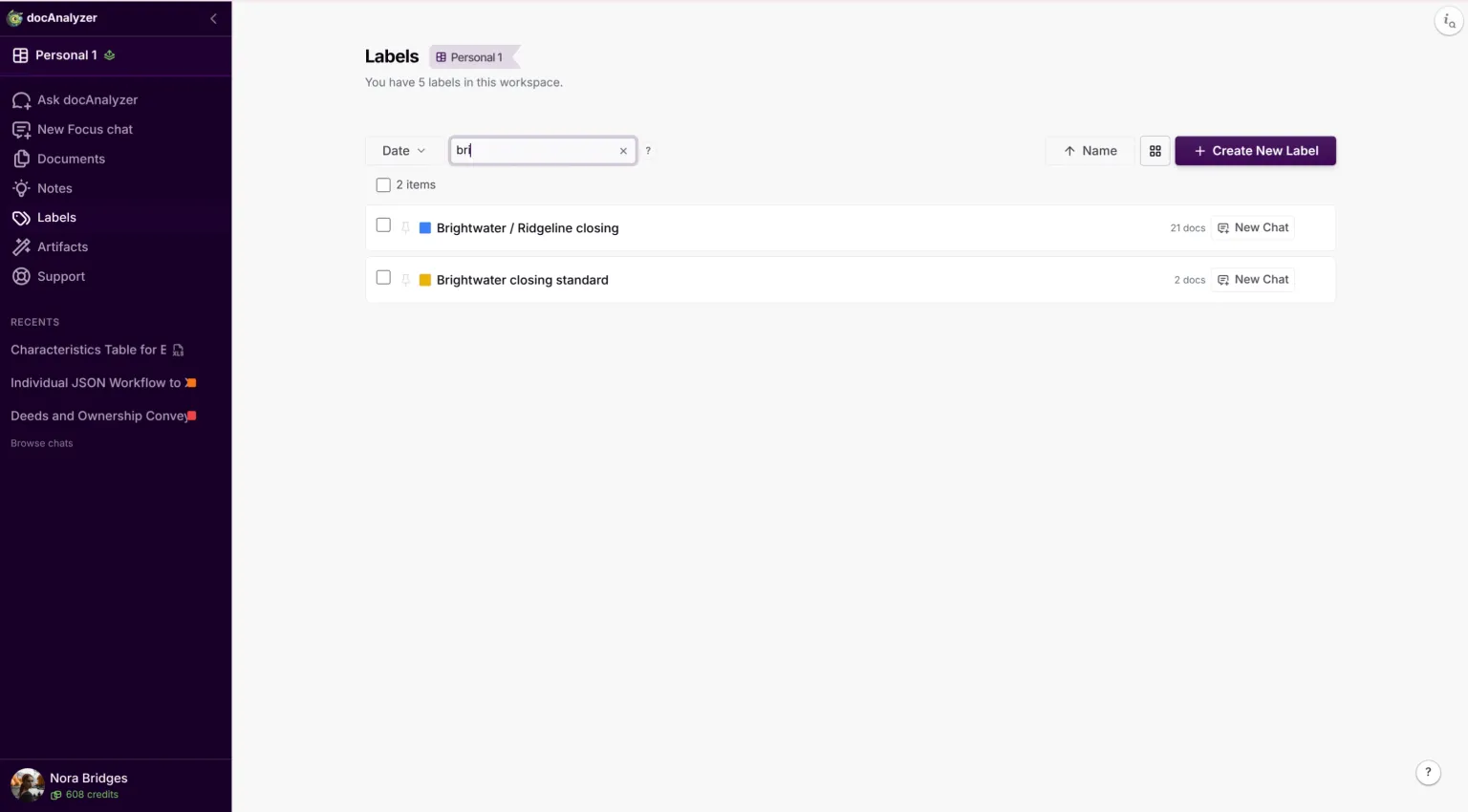
Upload the folder. A document, in docAnalyzer, is one file you have uploaded. A label is a tag you create and pin onto a group of them. It is how you keep this run to this deal rather than to everything in your account. Create one for the deal and pin it to every file in the folder.
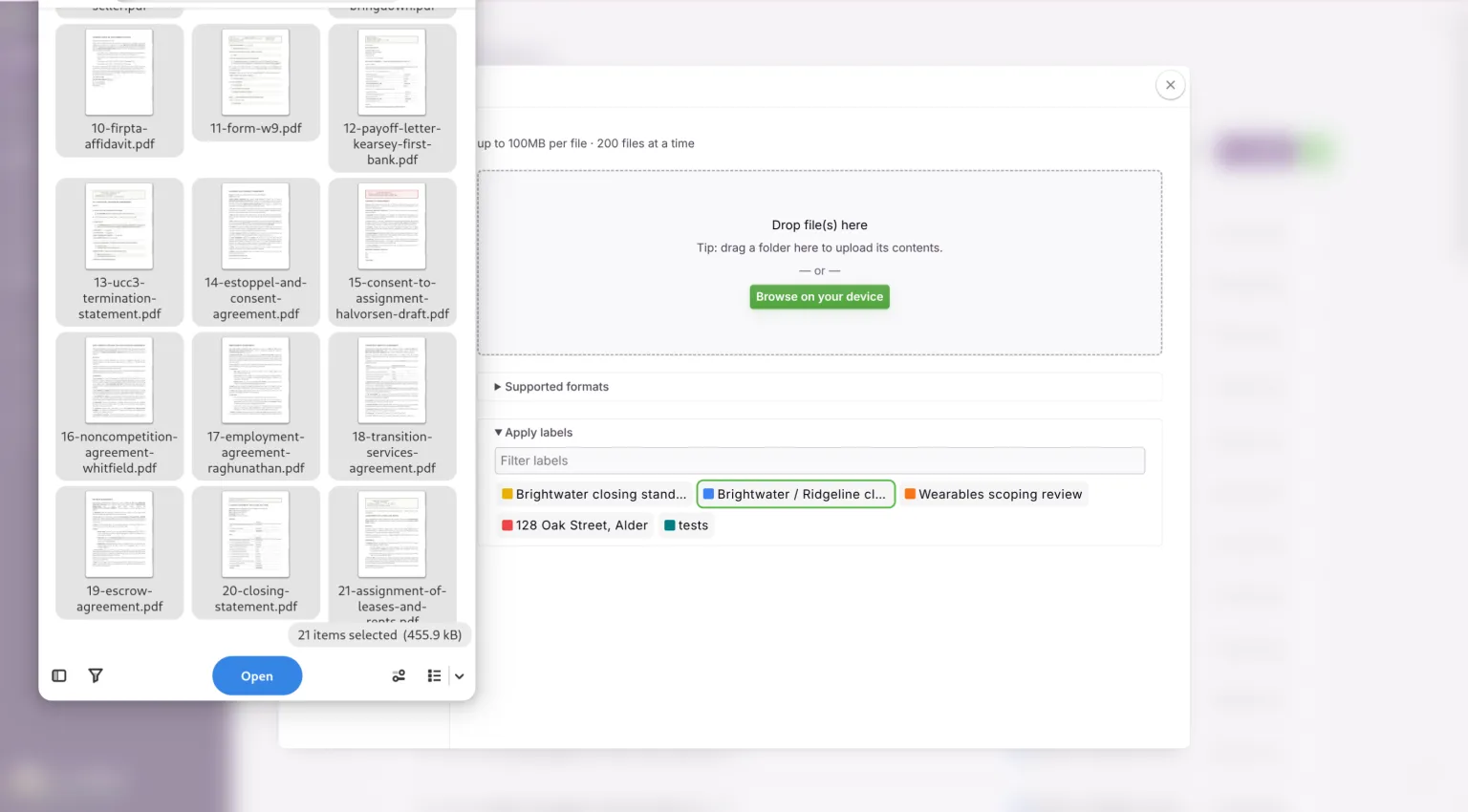
Then make a second label for the reference, and put the checklist and the facts sheet under that one. Two labels, and they must not overlap: one holds the binder, the other holds the standard the binder is measured against. The Blueprint workflow asks you to pick the second one, and it calls it the Reference label.
One practical limit before you start moving files. The free plan takes ten new documents a month. That is enough to run the method on a handful of them and see what it does, and not enough for a binder. A paid plan lifts that and also unlocks Thinking Effort, which is read-only below it. Everything here was run with it raised.
Two things have to be true of the folder before any of this is worth doing. The documents are separate files, one document to a file, so if the associate scanned the whole binder to a single 400-page PDF, split it first. Scanned pages are read: OCR runs automatically during analysis, and where pages still come back without text there is an Enhanced OCR option on the document's action menu, priced by the page. Budget for that on a binder that arrived as a scan. And the executed versions are in there. A mix of drafts and executed copies is fine, and sorting them is part of the job. A folder holding only drafts because the executed set is still with the escrow agent is not: stop and go and get it.
The unit is the instrument, not the checklist row. What comes back from a run is one result per file. A file holding six separate certificates returns one result for all six, and you have lost the thing you needed. Split those.
But an executed agreement with its schedules, exhibits, counterparts and signature pages is one instrument. Taking it apart to get a result per row damages it. Detached schedules make a complete agreement look incomplete, and a signature page filed on its own proves nothing about what it was attached to. Leave it whole. A single document can answer more than one checklist row, and the run will say so.
So: split a combined scan at instrument boundaries, keep each instrument entire, and where you make derived files record the parent filename and page range on them. Preserve whatever you received unchanged and work on copies.
Keep the checklist and the facts sheet out of the binder label. They are the standard, not the pile being measured against it, and a document that sits in both labels gets evaluated against itself.
One limit, before it bites you. The reference has to fit inside half the model's context, and the run refuses outright rather than silently truncating. A checklist of fifty rows and a page of facts comes to about eleven hundred words, nowhere near it. A checklist plus every schedule and the full purchase agreement will reach it. If you find yourself adding documents to the reference to give it context, you have started measuring the deal against itself.
Step 4. Write the instruction
The reference says what the standard is. The instruction says what to report about each document measured against it. Blueprint imposes no shape of its own, so the shape you ask for is the shape you get, and a vague ask produces prose you cannot subtract from anything.
Turn on Return structured JSON before you write it. That is what makes the result a record per document rather than an essay per document. It is the difference between a run you can pivot in Step 6 and one you have to read. With it on, you describe the fields you want and the app takes care of the shape. Your instruction only has to say what to report.
Ask for four things per document, and ask for them as fields:
- What this document is, in its own words. The title on its face, its date, and the parties to it.
- Which checklist rows it satisfies, by identifier, or the explicit statement that it satisfies none.
- For each row claimed, the status: conforming, or an exception. Name the exception. Do not accept a label whose first word is "satisfied" with a qualifier after it, because in a spreadsheet the qualifier gets filtered, truncated or skimmed and the row reads as covered.
- The evidence: the language on the document's face that supports the claim, quoted, with where it appears. Ask for the shortest passage that establishes it, or you will get the whole provision. On an unsigned certificate the evidence is the three empty lines under "By:", not the recitals above them. A quote you can check in a second is worth more than one you have to read.
Then a fifth thing, which is not about this document at all: the whole checklist, copied out. Every row identifier, the deliverable as the checklist words it, and any marking you put on it in Step 1. In checklist order, whether or not this document has anything to do with any of them.
That will look like waste, because all sixty documents will return the same list. Step 6 is where you find out why it is the one field you cannot drop.
Then the two clauses that do the real work:
If this document satisfies no row on the checklist, say so plainly and give the reason. Do not select the closest row.
Report only what is on the face of this document and in the reference. Do not infer that a signature exists because a signature block exists, or that a document is executed because it is complete.
The first clause is not decoration. A folder gathered by hand contains documents that belong to no row, and the most common of them is a document from an earlier financing that reads like a deal document. An assignment of leases and rents given to the seller's bank in 2019 has the vocabulary of a closing deliverable, and asked to pick the closest row, a model will pick one. Once it does, you have a tick against a row that nothing satisfies. That is worse than the blank you started with: a blank sends you looking and a tick stops you.
The second clause is aimed at the defect that is hardest to see: a certificate that is complete, correct and unsigned. Everything you look for is there, and the execution block is blank.
Here is the whole of it, as run. The pilot behind the figures used exactly this, so it is the thing to paste rather than a thing to reconstruct from the description above.
You are auditing one document from a closing binder against the closing checklist and the deal facts in the reference.

Report on exactly these fields:
- "document_title": the title on the face of this document, copied as printed.
- "document_date": the date this document bears, as printed. If it bears none: NOT DATED.
- "parties": the parties to it, by the legal names printed on it.
- "checklist_rows": a list, one entry per checklist row this document satisfies or purports to satisfy. An empty list when it satisfies none.
- "satisfies_no_row": true when "checklist_rows" is empty, false otherwise.
- "no_row_reason": when "satisfies_no_row" is true, one sentence saying what this document is and why no row on the checklist calls for it. Empty string otherwise.
- "checklist_inventory": every row on the checklist, in checklist order, whether or not this document bears on it. A list, each entry carrying exactly three fields: "row_id", the identifier as the checklist prints it; "deliverable", the deliverable as the checklist words it, copied not paraphrased; and "marking", the checklist's own marking on that row copied verbatim where it carries one, for example "waived, buyer's email 5 March" or "post-closing, 30 days", and an empty string where it carries none. This field is about the checklist and not about this document, so it is identical in every answer. Never abbreviate it, never omit a row because this document does not touch it, and never stop early.

Every entry in "checklist_rows" carries exactly these fields:
- "row_id": the identifier exactly as the checklist prints it, for example "B-2". Never an identifier the checklist does not carry.
- "status": either "conforming" or "exception".
- "defect": when status is "exception", one sentence naming the requirement it fails and how. Empty string when status is "conforming".
- "supporting_extract": the shortest passage that establishes the claim, normally a sentence. Copy it exactly, do not paraphrase. Quote the words that prove the point, not the provision they sit in: where a row fails because an execution block is blank, the blank block is the extract and the recitals above it are not. Where the point rests on the absence of text, quote the labels that stand empty.
- "source_location": where that text sits in this document.

Rules:
- If this document satisfies no row on the checklist, say so plainly and give the reason. Do not select the closest row.
- Report only what is on the face of this document and in the reference. Do not infer that a signature exists because a signature block exists, or that a document is executed because it is complete.
- A checklist row that states a requirement is tested against that requirement. Where a row calls for a date inside a period, an executed instrument, or delivery by a named party, a document that does not meet it is "exception" and the defect names the requirement.
- The deal facts in the reference are part of the standard, not background. Where a document's signer is inconsistent with the authority the deal facts record, that is an exception, whatever the document itself asserts. Report the inconsistency and the two sources it sits between. Do not state a conclusion about whether the signer had authority.
- Where a row calls for something from each of several parties, or the termination of each of several filings, and this document covers only some of them, that is "exception" and the defect says which are covered and which are not.
- The checklist's wording and a document's own title will often differ. Match on what the instrument does, not on what it is called.
- Being about the right subject is not satisfying a row. The document has to be the instrument the row calls for.
Step 5. Run it
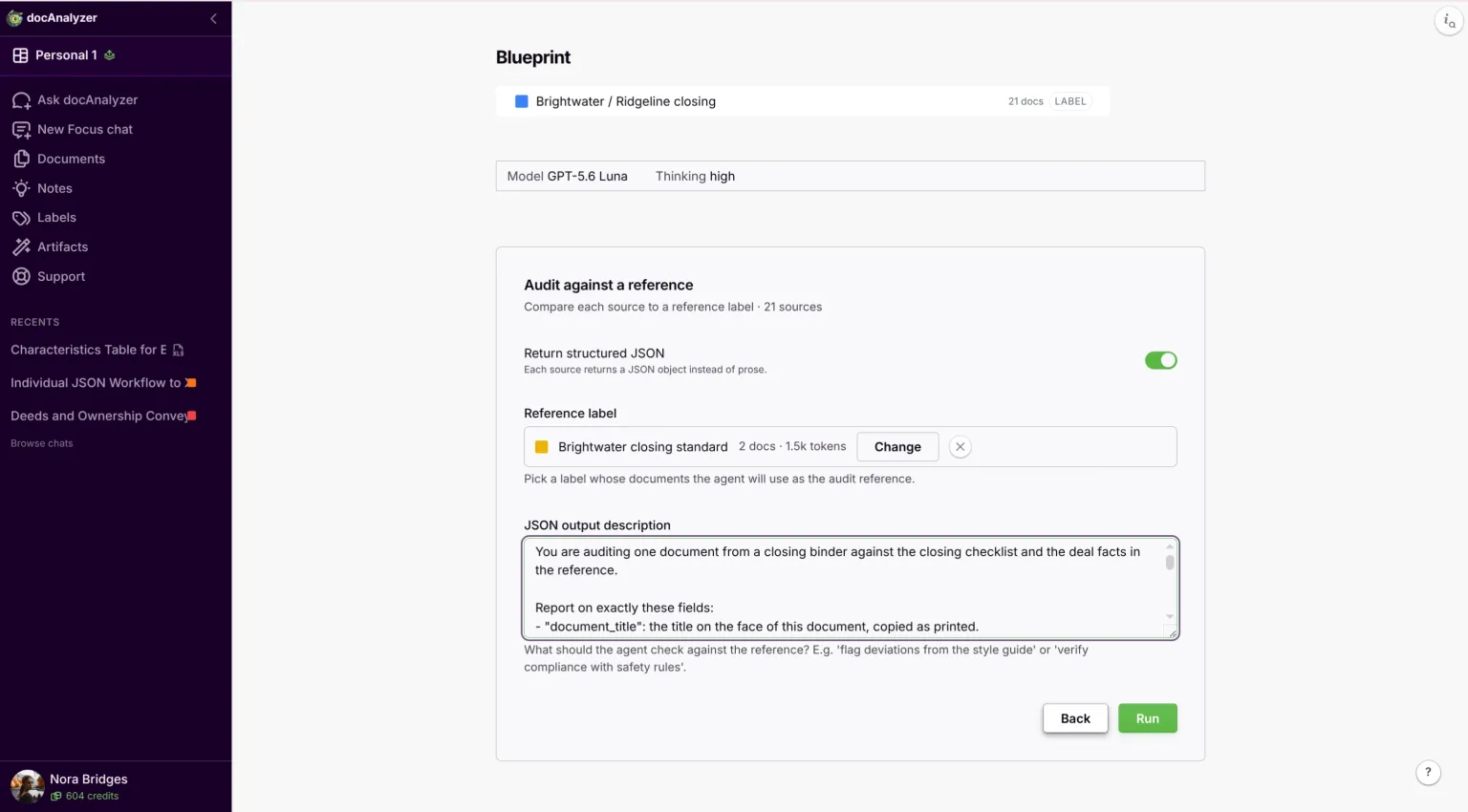
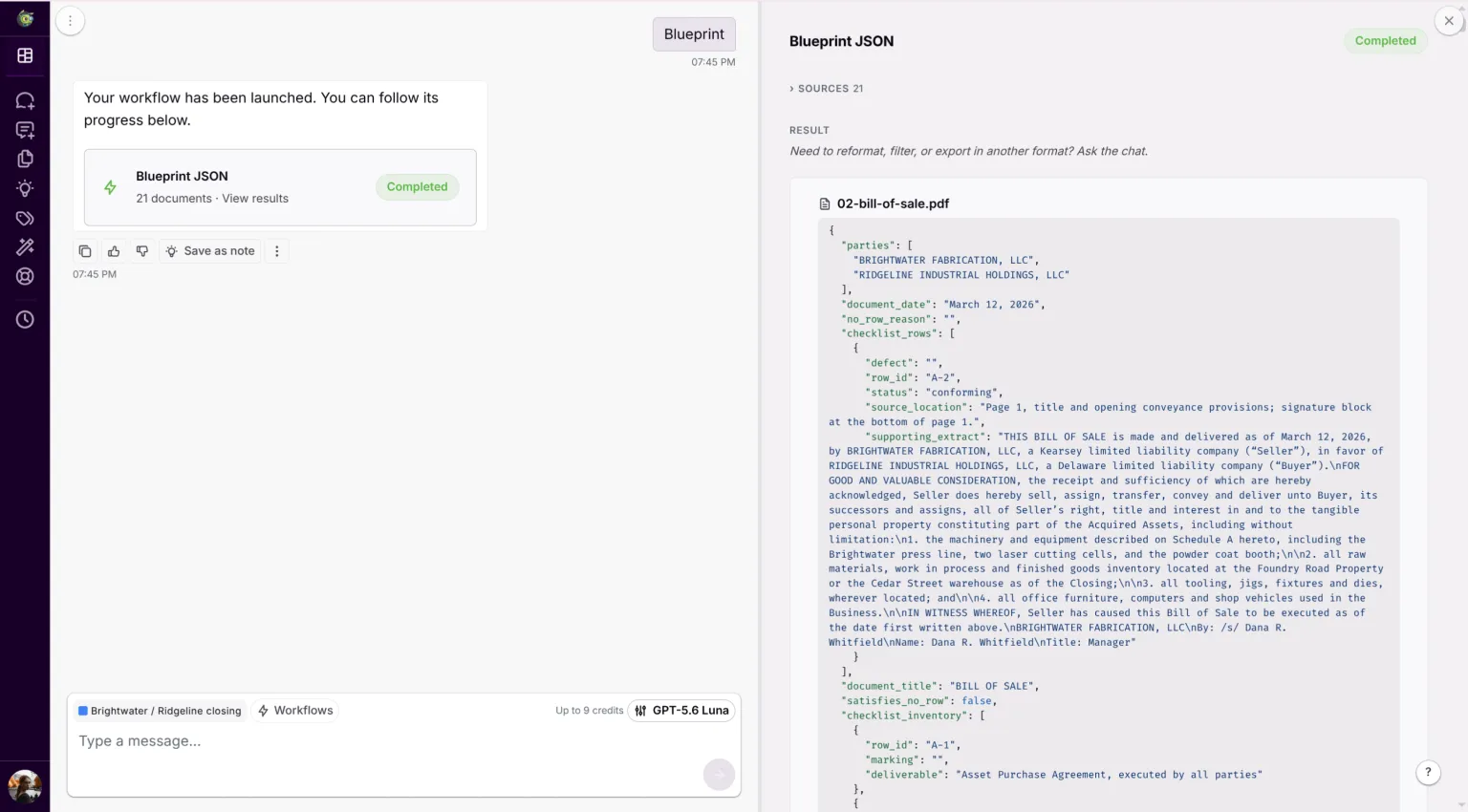
Pick Blueprint from the workflow list, choose the reference label, paste the instruction into the field below it, and run it across the binder label. With Return structured JSON on, that field is labelled JSON output description rather than Task. You get one result per document. Sixty documents give you sixty comparable records, not one summary of the folder. That is what the rest of the method needs, because you cannot subtract a summary from a checklist.
Another tool will do if it can manage four things:
- read each document separately against a reference you supply,
- return one identifiable record per document,
- say plainly when a document matches nothing,
- export the whole set.
One that gives you a single answer about the folder cannot do the subtraction.
Count the results before you read any of them. If there are fewer than you uploaded, a file never got pinned to the label, and the run cannot satisfy a row with a document it never saw. A document that comes back as an error was not read at all, which is a different thing from a document that matched nothing: re-run it before you build anything on top.
Step 6. Turn it around, from documents to rows
You now have one record per document, which is the opposite of what you need. Turn it around: go to the checklist and, for each row, list the documents that claimed it.
Do not shortcut this by asking the chat what is missing. A document cannot tell you it is absent. The unsigned officer's certificate is in the folder and can be read. The lien release that was never obtained is in no document at all. Asked what is missing, a chat answers from the shape of the question, and every item it gives you will be plausible.
The chat cannot see your checklist. The run reads it, because you attached it as the reference. The chat that follows reads the documents under the label, and your checklist is not one of them.
So if you ask the chat for a table of checklist rows, it will build one out of what it has, which is the documents. A row that no document claims generated no result, so nothing puts it on the table. You get a confident table of forty-one rows out of a fifty-row checklist, and a note that nothing appears to be missing.
This is what the fifth field in Step 4 is for. Every document carried the full checklist out of the run with it, so the chat has the complete list of rows even though it never saw the checklist itself. You build the table from that list.
Ask for it in the chat over the results:
Every result from the run carries the full checklist inventory. Take the union of those inventories, which is every row on the checklist, and build the table from that list rather than from the documents. One line per checklist row, in checklist order. Columns: identifier, the deliverable as the inventory words it, the documents claiming it, and the status. Where a row carries a marking on the checklist, put that marking and its reason in the status column, whether or not a document claims it. Where a row has no marking and no document claims it, write "no document" and leave the document column empty. Tell me how many rows the inventory holds and how many rows your table has, and if the inventories disagree with each other, say which rows they disagree about.
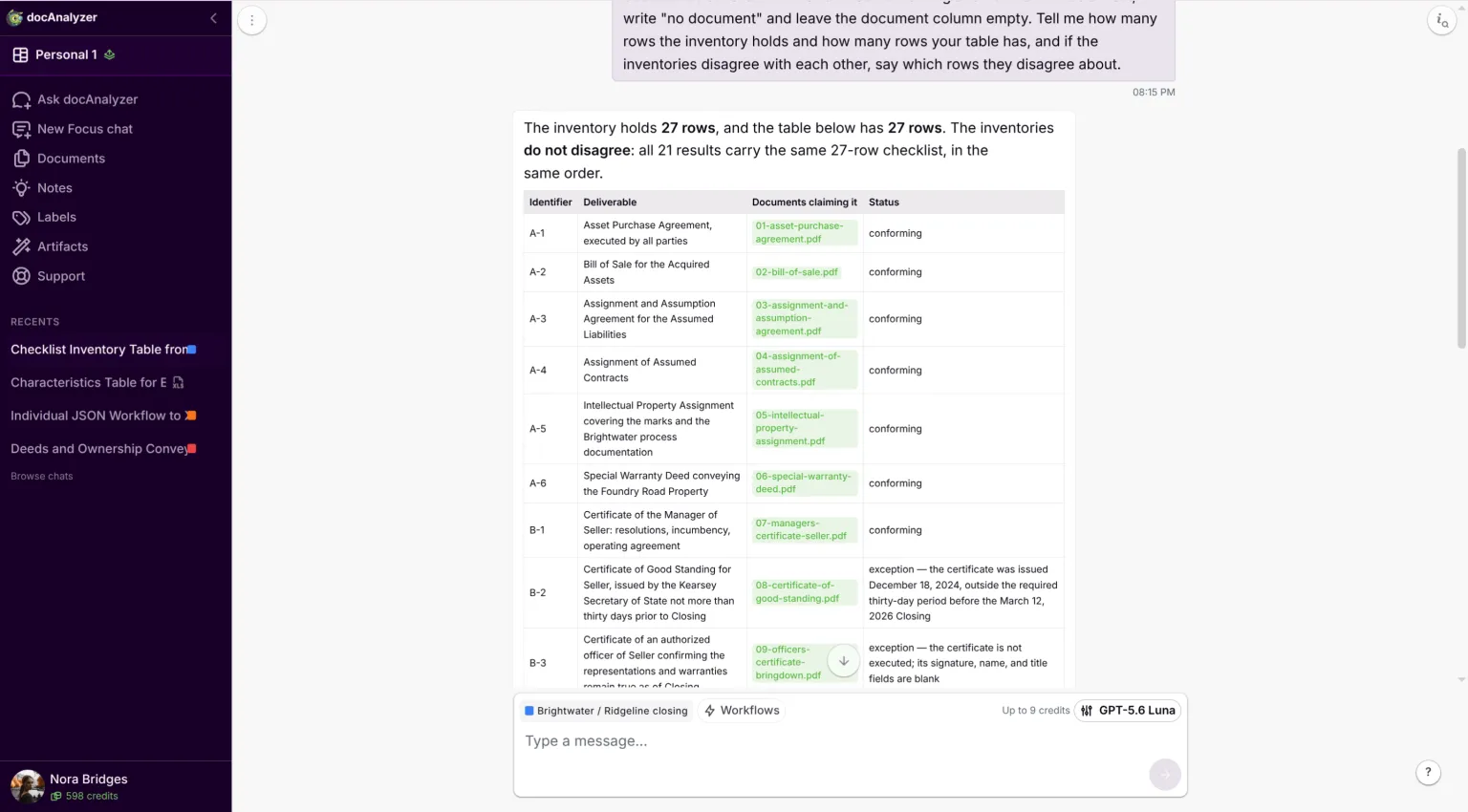
Treat a disagreement as a stop, not a note. If the two counts differ, or the results do not all carry the same rows in the same order, the table is not the checklist and nothing built on it is safe. Two inventories that were each cut short can combine into a union that looks complete. Find the result that is short, run that document again, and rebuild the table before you go any further.
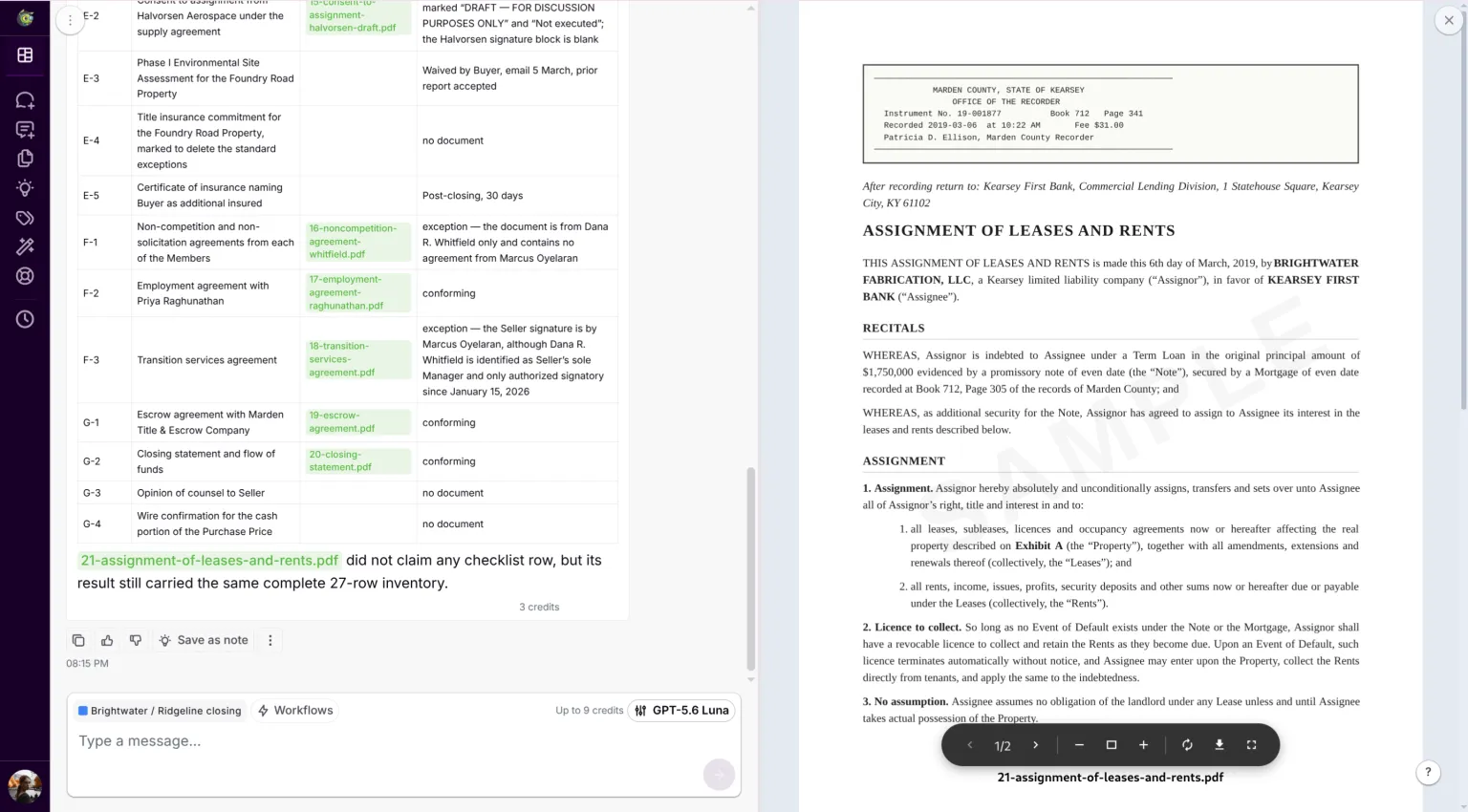
Four things fall out, and they are not worth equal time.
The rows you marked waived or not applicable come back marked, and you can stop reading them. The rows you marked post-closing come back marked too, and you cannot: they are open, they have dates, and they go onto the list you keep rather than the one you close.
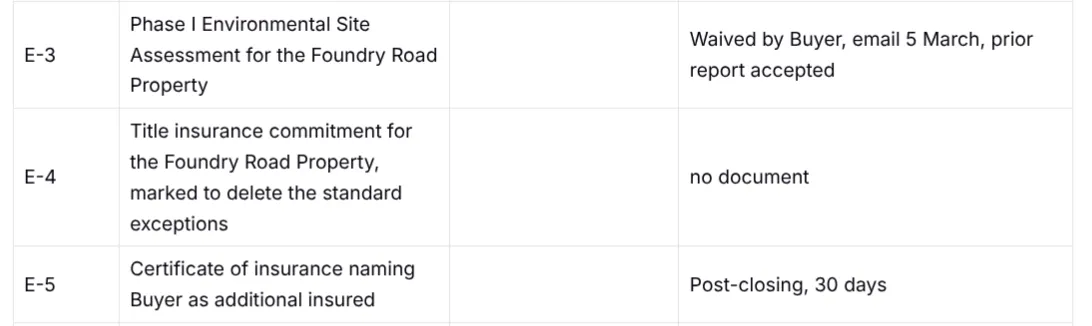
The rows with nothing against them and no marking are the answer you came for. Read every one of them, and read them against your own memory of the deal rather than accepting them, because the causes differ and only you can tell them apart. Some were waived and the waiver is in the correspondence. Some are somebody else's to deliver and are sitting in their inbox. Some were forgotten. Nothing in the output distinguishes them.
The rows with a defect named are where the work is. A certificate of good standing dated fourteen months before closing is on its face a certificate of good standing. A consent circulated for comment and never executed reads word for word like the executed version except for the banner. A UCC-3 that terminates one filing when two are of record is neither missing nor complete.
Rows with more than one document claiming them are a version question until you settle it. Establish which one is operative, mark the other superseded, and make sure a draft is not sitting in the final set looking like an alternative. Sometimes the row is simply worded loosely enough to catch two genuinely separate instruments, which is a note for next time.
The row that satisfies a differently worded item deserves its own note. Your checklist says "estoppel certificate from the landlord." The document in the folder is titled "Estoppel and Consent Agreement." It is the same instrument and it satisfies the row. Matching by title alone would have missed it, and this is the case that argues for a method that reads the document rather than sorting filenames.
Step 7. Check what it flagged, and sample what it did not
Nothing above is a finding yet. A row becomes a finding when somebody has opened the document behind it, and the point of the run is that it has already told you which rows to open first.
Open all of these. Every row with no document against it, every exception, every row with more than one document claiming it, and every row where the identification surprised you. That is the half where the table does not give you the answer, and it is yours.
Ask for them as a list rather than hunting them in the table:
List every checklist row whose status is an exception. One line each: the identifier, the deliverable, the document, what is wrong with it, and where in that document to look. Order them by section. Do not include rows that are conforming, marked, or have no document.
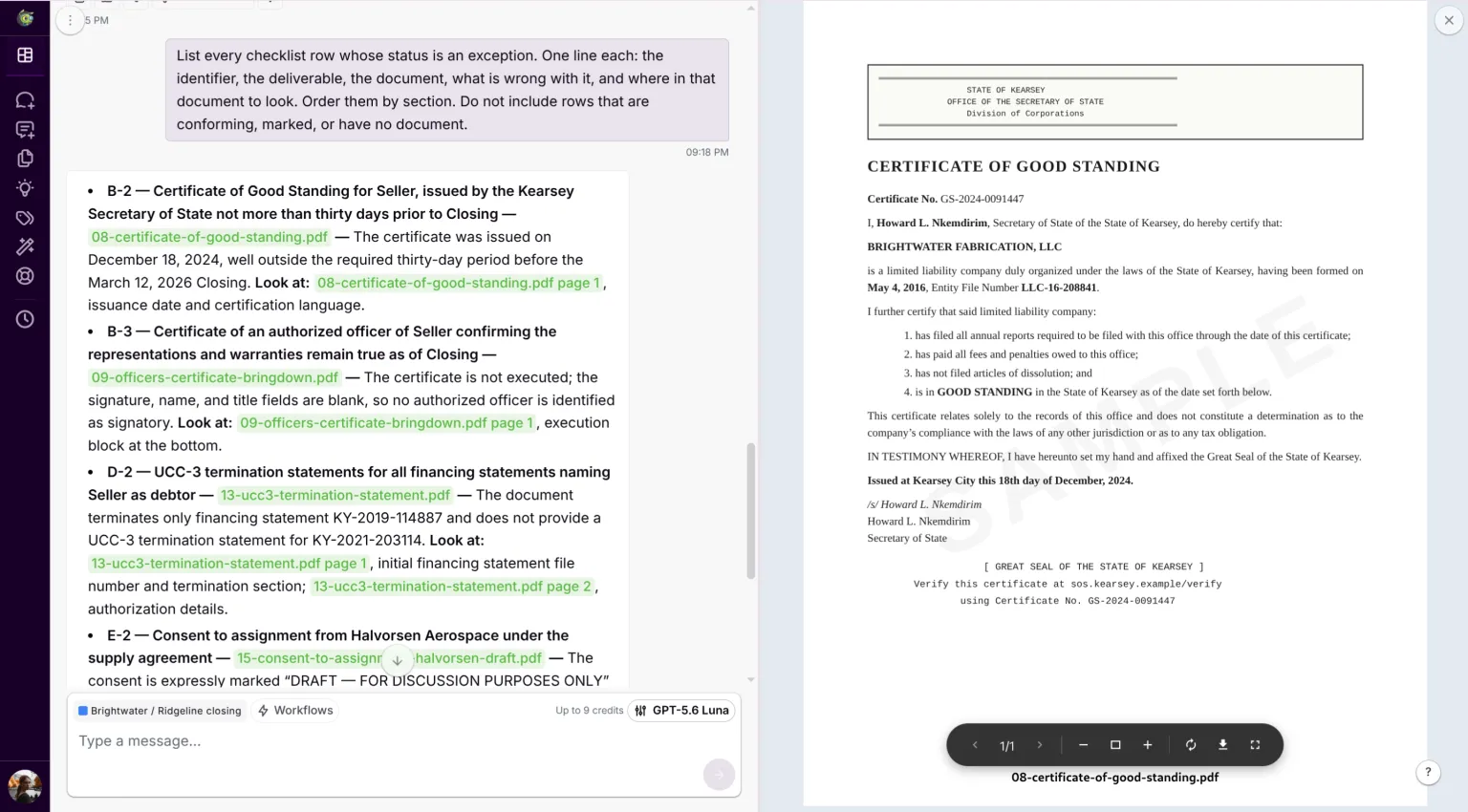
Open the ones it gives you, and any row where the identification surprised you. Check that the document is what it was called and that the defect is real. It is the same read you would have given it anyway. You are giving it to a handful of rows instead of sixty documents.
One thing to watch for that is particular to working this way. Each claim comes back with the language it relied on, quoted. If a quoted phrase is not on the page, that record was written rather than read. Distrust all of it, not just that line, and open the document yourself. How often that happens is not something this method measures, so treat it as a signal to know rather than a risk to price.
Then sample the conforming rows rather than reading all of them. They come with the document named and the page cited, so the check is quick and an associate or a trained paralegal can do it. Choose the sample deliberately rather than at random. Take at least one row that turns on execution: that is a fact about the signature block, not about the title. Take one whose document is titled differently from the checklist wording, because that is where a topical lookalike gets waved through.
A failed spot check stops the sampling. One wrong row is a wrong row. Three in the same section is a rule that did not hold. The answer to that is to correct the instruction and re-run the affected class, not to keep checking by hand until you have done all sixty. Work out which of the two you have before you carry on.
The run does not replace the review. It replaces the hunting: nobody opens sixty documents looking for which row each one answers, and nobody reconstructs a checklist from a folder. What is left is reading documents you have already been pointed at.
Sampling is a judgment, not a proof, and it is worth saying what it does not cover. Checking only what the run flagged tests one direction. It catches a row wrongly called an exception and it cannot catch the opposite: the draft, the missing signature, the stale date that came back conforming. Nothing here measures how often that happens, and three runs on a fixture built by the person writing the guide would not tell you if they did. That is what the sample is for, and why a bad one widens instead of getting noted.
One row will not behave. Sometimes a deliverable was made and whether it worked turns on something else. Then the verdict is a judgment, not a fact, and you get one defensible answer out of two. Take an assignment of contracts. It was executed and it is in the file, so the row is met. It also says it does not assign any contract whose consent never came, and one of them never came, so the row is not met. Both readings are right and the run picks one. That is your row, and the tell is a defect you would have argued about.
Step 8. What to hand over
Export the table. Three columns matter to whoever reads it next: the checklist row, the document that satisfies it, and where in that document the satisfying language sits.
Export the checklist table you built earlier, the one with a line per checklist row, as an .xlsx file, one sheet named checklist, one row per checklist item in checklist order, with the columns you used. Add two further columns after them: supporting_extract and source_location, copied from the run for the document claiming that row, and left empty where no document claims it. Cover every checklist row, not a sample. The status column carries exactly what the table showed, including "no document" and any marking: never leave a status cell blank. For the two new columns only, leave the cell empty where no document claims the row. Do not open the documents again and do not fill in anything the run left empty.
The last clause is the one that matters. Asked for a spreadsheet, a model will fill an empty cell rather than leave it empty, and the empty cells here are the findings.
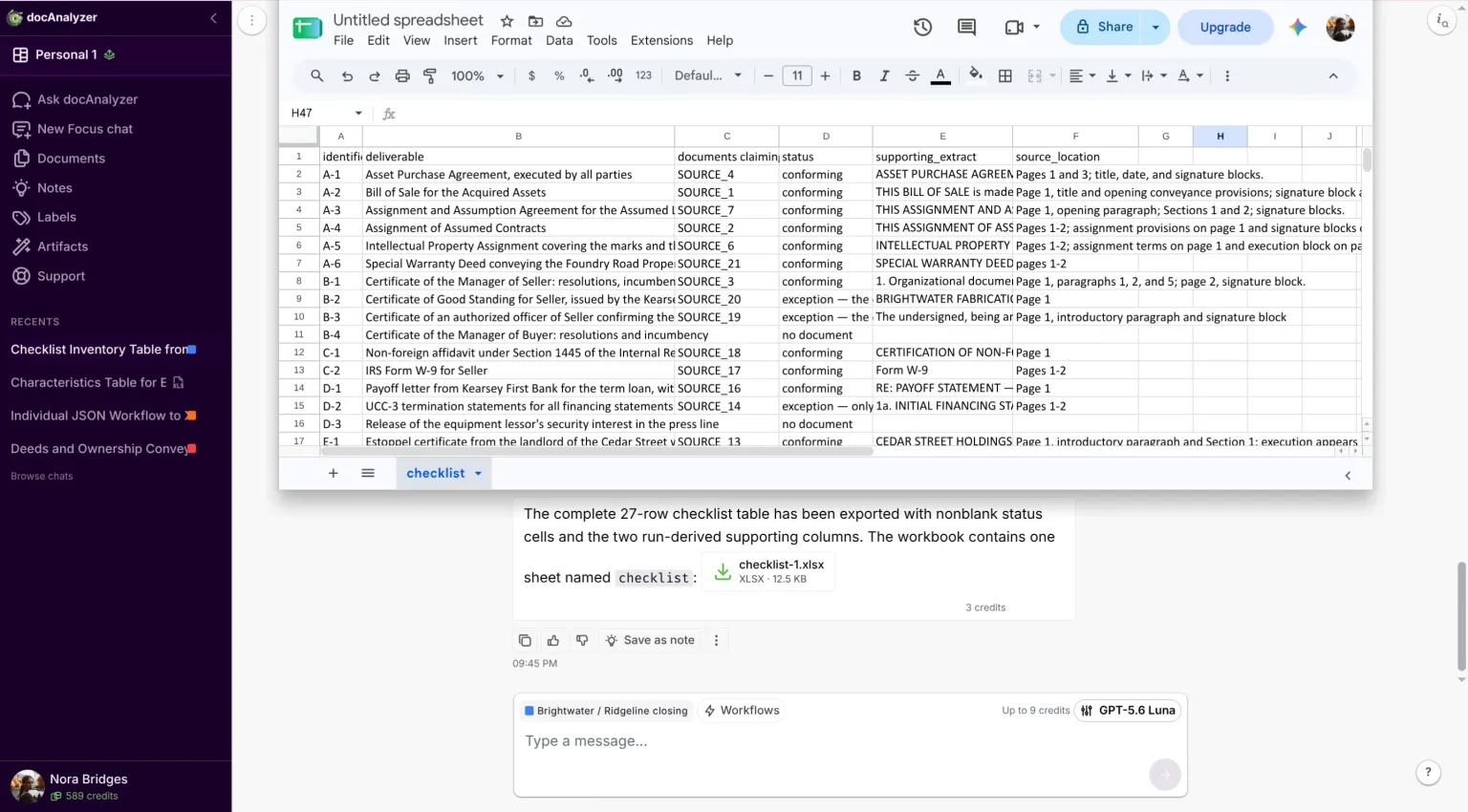
The exported sheet names documents as SOURCE_4, not as filenames. Those are the run's own numbering. They resolve to a document inside the chat, where they are what the clickable citations are built from, and they mean nothing in a spreadsheet six months later.
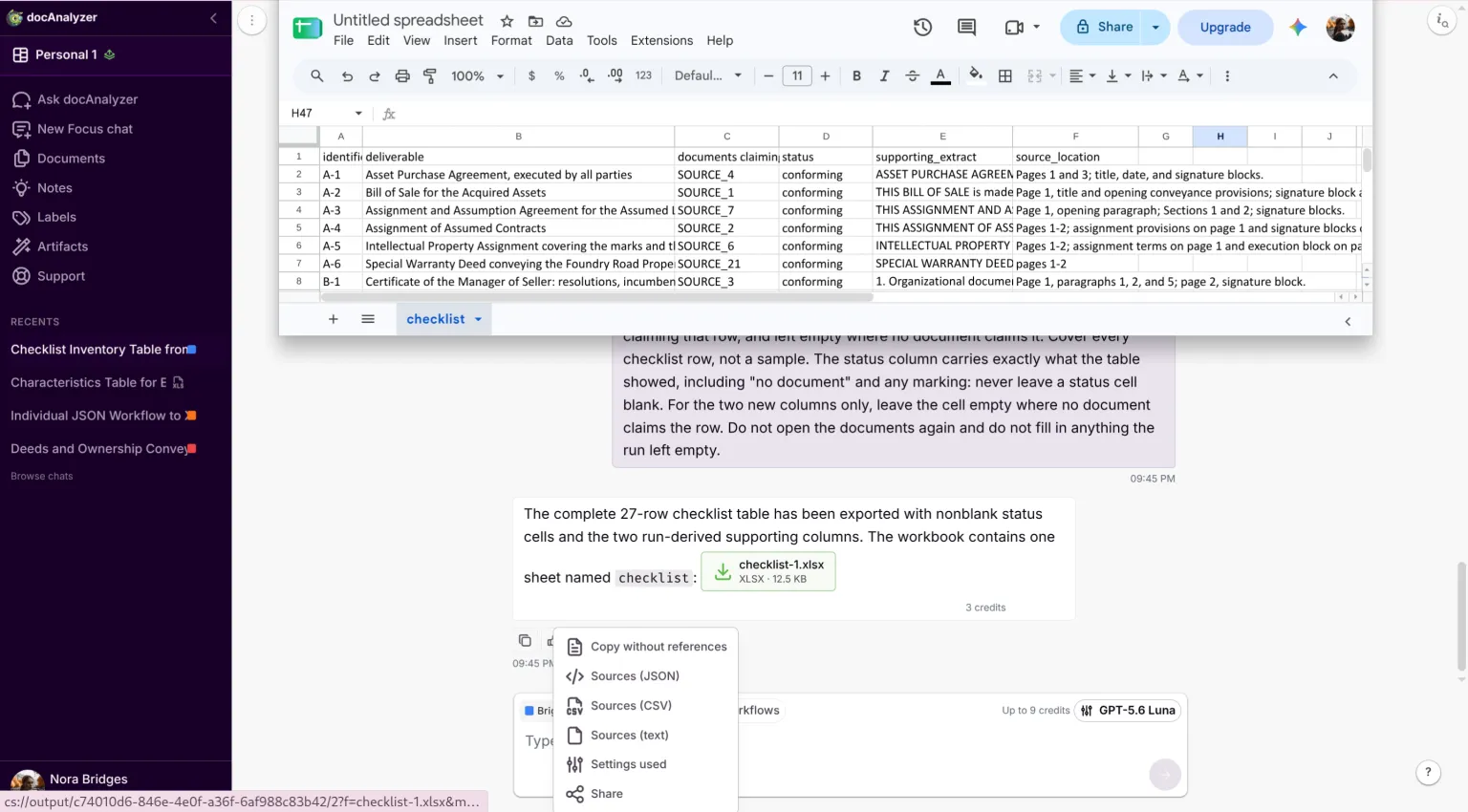
The app will give you the mapping. Under the answer is a row of small buttons ending in a ⋮. Open it and take Sources (CSV). It is built from the document records rather than from the answer, so it has not passed through a model. Its name column is your filename, against a source and nr that match the tokens in the sheet. Join on that and the workpaper carries real names.
Do the join before you file it. A spreadsheet whose document column reads SOURCE_18 cannot answer the question the whole exercise is for, and it will not get more answerable with age.
Two lists come off the back of it. The outstanding items, which is the memo to the deal team and the thing that gets chased. The exceptions, which is the shorter and more delicate list: items that exist but do not conform, each with what is wrong and what would fix it.
Keep the working table. Six months on, the lender's counsel asks about the FIRPTA certificate. You can say which document answers that row and where the language sits, in the time it takes to open a file. Whether it was delivered is a different question. That answer lives in the transmittals and the escrow release.
One last thing, and it belongs to the matter rather than to the tool. Keep what makes the audit reproducible: the checklist you dated in Step 1, the facts sheet, the instruction you ran, the model and the settings, the raw output, the exceptions and what you decided about each of them, the Sources file and the workpaper itself. Keep them where the matter file is kept and for as long as the firm keeps it. The raw output is working material and not the workpaper.
Then close the other end. When the firm's approved period for third-party processing runs out, delete the uploaded set and record the deletion the way your vendor procedure requires. Step 3 asked whether these documents could go to an outside service at all. This is the second half of that question, and it is the half that gets forgotten.
What this method does not do
It does not know what should be on the checklist. It measures the folder against your list, so a deliverable you left off the checklist comes back as a complete file. Nothing in the output will hint at the omission. That is the largest risk here and it sits upstream of the tool, which is why Step 1 sends you back to the conditions article first.
It does not read what is not there in a second sense either. A side letter emailed between counsel and never filed to the deal folder is invisible, and so is the waiver that lives in a thread. It audits the folder you point it at.
It does not exercise judgment about sufficiency. Whether an opinion is in acceptable form, whether a defect is material, whether to close over an exception. Those are yours.
And it does not replace a full read where one is called for. Original custody, a client policy, regulated information, a filing consequence or a bad scan can each require one on a modest deal, and none of them turns on how large the deal is.
What it costs
Twenty-one documents against a twenty-seven row checklist took about four minutes of machine time and a few credits, on GPT-5.6 Luna with thinking raised. The run was most of both. The three chat turns that follow are short, and each shows the most it can spend before you send it.
That is the machine's share. It says nothing about your twenty minutes in Steps 1 and 2, and it was measured on a folder already split one document to a file. A binder that arrives as one scan costs whatever splitting it costs, before any of this starts.
A sixty-document binder has not been measured. The run is per document, so three times the documents is roughly three times the run. The three chat turns grow with the checklist rather than the pile, so they will not simply treble.
Corrections
If something here is wrong, tell us. Screens change, prices change, and a step that was accurate in August may not be in March. Write to [email protected] with the guide name and what you found, and we will correct it and date the correction.
Product trouble is a different queue: [email protected].
Last updated 24 August 2026.
Copyright and licence
© 2026 AI For Verticals, Inc. docAnalyzer® is a trademark of AI For Verticals, Inc.
This guide, its text and its figures, is published under the Creative Commons Attribution-NoDerivatives 4.0 International licence. Copy it, print it, circulate it in your office, put it in a training pack, hand it to a client, host it yourself, commercially or not. Two conditions: credit AI For Verticals and link to the licence, and pass it on whole rather than as an edited version. Quoting it and citing it in your own work are neither of those things and need no permission beyond ordinary attribution. The licence covers the guide. It grants no rights in the docAnalyzer name or marks.
The documents in the worked example are a separate matter and carry a broader grant. They are invented, they are ours, and they are released for reuse under the Creative Commons Attribution 4.0 International licence: run the method on them, cut them, rewrite them, build a training exercise out of them. The parties, entities, jurisdiction, bank, notary, recording data and filing numbers do not refer to any real person, company or place, and every page is stamped SAMPLE. Nothing there is a genuine executed instrument and none of it should be presented as one.
docAnalyzer is our product, which is why the walkthrough uses it. The method needs a tool that reads each document separately against a reference you supply, and Step 5 says what to look for if you would rather use another.